Neopress growth journal
Multilingual Website SEO Checklist: 9 Things to Verify Before a New Language Goes Live

Translating only the visible parts of your website does not make it show up in search for a new audience.
Search engines need to find each language version on its own, and visitors need to complete the whole journey in their language, from the menu to the contact form.
Once the translation is done, check three things:
Can it be found? Each language has its own URL, and search engines can read it.
Are the pages paired? The English page and the Korean page are marked as versions of the same content.
Does the journey hold? Menus, buttons, and forms stay in the same language from start to finish.
This guide breaks those three questions into nine practical checks.
1. Decide whether you are targeting a language or a country
If every English-speaking visitor sees the same content, one English page is enough. If customers in the United States and the United Kingdom need different prices, shipping terms, or legal terms, you are splitting by country, not just by language.
In that case, use language codes that include a country code.
| Situation | Language code |
|---|---|
| Same content for all English speakers | en |
| Content for Korean speakers | ko |
| Different prices or terms for the US and UK | en-US, en-GB |
Add a country code only when the content actually differs by country. Adding one because it looks more precise only gives you more pages to maintain.
See Google's guide to multi-regional and multilingual sites for the detailed criteria.
2. Give every language its own URL
The English page and the Korean page need different addresses. If your English pricing page lives at /pricing, put the Korean version at a separate path such as /ko/pricing.
Avoid serving different languages at the same URL based on the visitor's browser settings. Search engines usually see only one version, and a shared link may open in a different language for the person who receives it.
There are three common ways to structure language URLs.
| Structure | Example | Benefit | Overhead |
|---|---|---|---|
| Subdirectory | example.com/ko/pricing | One domain to manage | Low |
| Subdomain | ko.example.com/pricing | Easy to host languages separately | More setup and maintenance |
| Country domain | example.kr/pricing | Clear country targeting | Separate domains to buy and run |
For a small team, subdirectories are usually the easiest to maintain. Whichever structure you choose, apply the same rule to every page.
The following patterns make language pages harder to find and pair correctly.
| Incorrect pattern | Example | Why it causes problems |
|---|---|---|
| Change the language at the same URL | example.com/pricing serves English or Korean according to the browser language | Search engines and shared links may not receive the same language consistently |
| Mix URL rules across pages | Use /ko/pricing, /about?lang=ko, and ko.example.com/contact on one site | Internal links, sitemaps, and hreflang become difficult to maintain consistently |
| Add country codes without country-specific content | Create both /en-US/ and /en-GB/ while showing every English visitor the same content | You create duplicate pages and extra translations to maintain |
3. Translate the body and every supporting detail
Translating the body does not finish the job. Menus, buttons, search snippets, form instructions, and error messages should continue in the same language so the visitor experiences one complete page. Google primarily uses the visible main content to determine a page's language, but leftover copy in another language can still interrupt the journey and weaken the page's language signals.
These parts are the easiest to miss:
The meta title and description shown in search results
Image alt text and text inside tables
Form hints, error messages, and the confirmation message after submission
Currency, date formats, contact details, and business hours
The title and image shown when someone shares the link
A literal translation is sometimes not enough. Examples that make sense to a US reader may not land with a Korean reader. Keep the facts the same, and adapt the examples and wording to each audience.
4. Make the language switcher open the same page
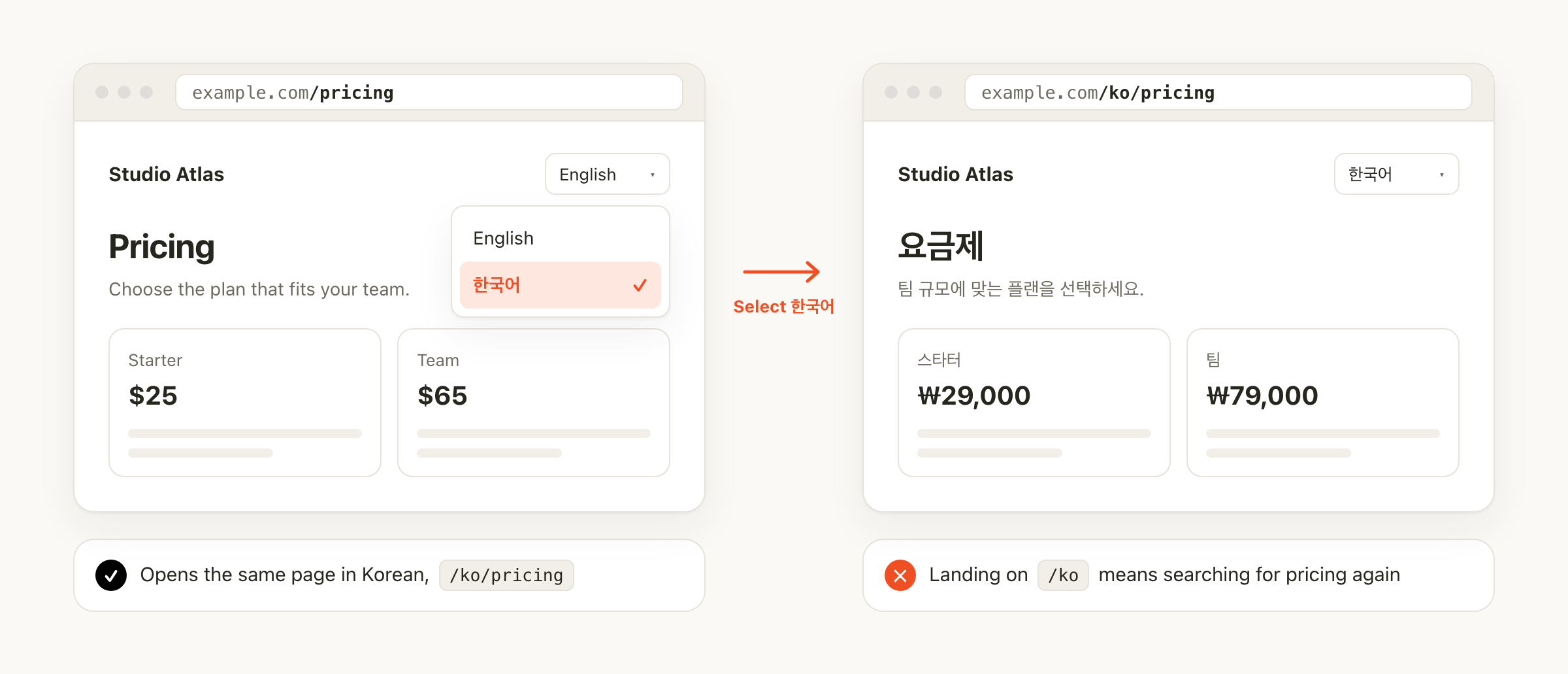
If a visitor reading the English pricing page switches to Korean and lands on the Korean homepage, they have to find the pricing page again. The language switcher should open the current page in the other language.
Avoid automatically redirecting visitors based on their location or browser language. Bilingual visitors, such as a Korean speaker living in the US, lose control over which version they see, and search engines may not be able to reach every version. Suggesting a language is fine. Let the visitor make the choice.
Open each language URL directly in a private window. Click the language switcher and confirm that it opens the same page in the other language, and that the header, footer, and contact button switch with it.
5. Use hreflang tags to tell search engines the pages are a pair
hreflang is an HTML annotation that tells search engines, "this English page and this Korean page are the same content in different languages." Google uses it to show Korean searchers the Korean page and English searchers the English page.
For an English and a Korean pricing page, both pages need to include these tags:
<link rel="alternate" hreflang="en" href="https://example.com/pricing" />
<link rel="alternate" hreflang="ko" href="https://example.com/ko/pricing" />
<link rel="alternate" hreflang="x-default" href="https://example.com/pricing" />
The first line points to the English page and the second to the Korean page. The third line, x-default, names the page to show when no listed language matches the visitor. It is optional.
The most common mistake is adding the tags to only one page. If the English page points to the Korean page, the Korean page must point back. When the pages do not reference each other, Google may ignore the pairing. Google's localized versions guide covers the full rules.
6. Point each page's canonical to its own URL
A canonical tag tells search engines which URL is the main version when several pages look alike.
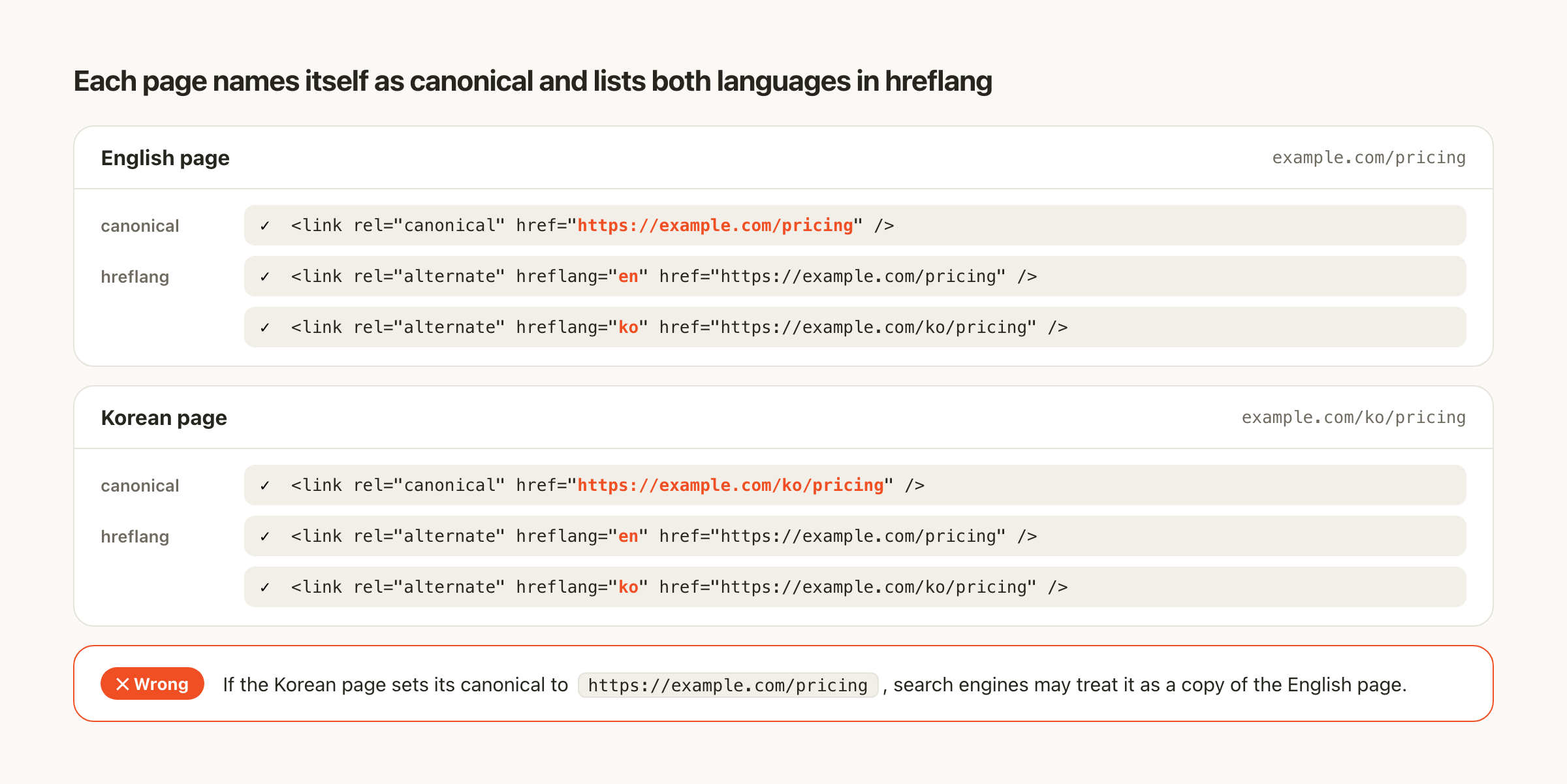
Each language version should name itself as canonical. The English page's canonical is the English URL, and the Korean page's canonical is the Korean URL.
| Page | Correct canonical | Wrong canonical |
|---|---|---|
English /pricing | /pricing | The Korean URL |
Korean /ko/pricing | /ko/pricing | /pricing |
If the Korean page names the English URL as canonical, search engines may treat the Korean page as a copy of the English one and leave it out of results. Google's canonicalization guide explains how these signals work.
7. Open each URL and check what loads
Reviewing the translation file will not reveal routing or rendering problems. Open each language URL directly and check:
The page loads without a 404 error.
The search title, description, and main heading are in that language.
The canonical points to the page's own URL.
hreflang lists both language URLs.
Key links, such as the contact button, stay in the same language.
Also open View Source (Ctrl+U on Windows, Command+Option+U on Mac) and confirm that the body text appears there. If the text shows on screen but not in the source, search engines may read it late or miss it. Our guide to server-side rendering and SEO walks through this check.
8. Read the translation on the actual page
Review translations on the live page, not in a spreadsheet. Korean and English take up different amounts of space, so buttons can clip and lines can break awkwardly on mobile.
Check three things as you read:
Accurate: Prices, conditions, and limits match the original.
Natural: Nothing reads awkwardly to a native speaker.
Consistent: The menu, body, and buttons use the same word for the same thing.
AI translation gets you a draft quickly, but a person should do the final review before the page goes live. If the copy reads smoothly but says little, run it through our AI slop design checklist.
9. After launch, check each URL separately
A healthy English page does not mean the Korean page is healthy too. Use the URL Inspection tool in Google Search Console on each language URL.
Record search status in three stages so problems are easier to locate.
| Stage | Meaning |
|---|---|
| Accessible | Google can open and read the page |
| Indexed | The page is in Google's index |
| Showing in search | The page appears in results for real queries |
A page can be accessible but not indexed, or indexed but not showing for the queries you want. Track performance per language as well. Combining impressions from both languages hides which version has the problem.
Handle multilingual setup through AI chat in Neopress
Doing all nine steps by hand means designing URL rules, adding tags to every page, and translating menus, forms, and posts one by one. That is a lot for a marketer running a website without a developer.
In Neopress, the technical setup such as URLs and search tags happens automatically, and you handle translation and edits by asking the AI.
| Checklist item | By hand | In Neopress |
|---|---|---|
| Language URLs | Define URL rules and build them | The default language stays at /pricing; each added language gets a path like /ko/pricing automatically |
| Translating copy, menus, and forms | Copy and translate each item | Ask the AI to translate page copy, header and footer, contact forms, and blog posts in one request |
| Language switcher | Link every page by hand | Internal links keep the current language, and the switch link is disabled when a post has no translation |
| hreflang | Add tags to every page and keep them in sync | Pages are paired automatically across the languages they are published in, and the sitemap includes them |
| Canonical | Set a canonical for every page | Each language URL is set as its own canonical automatically |
| Search title and description | Write separately for each language | Set per language, or ask the AI to write them |
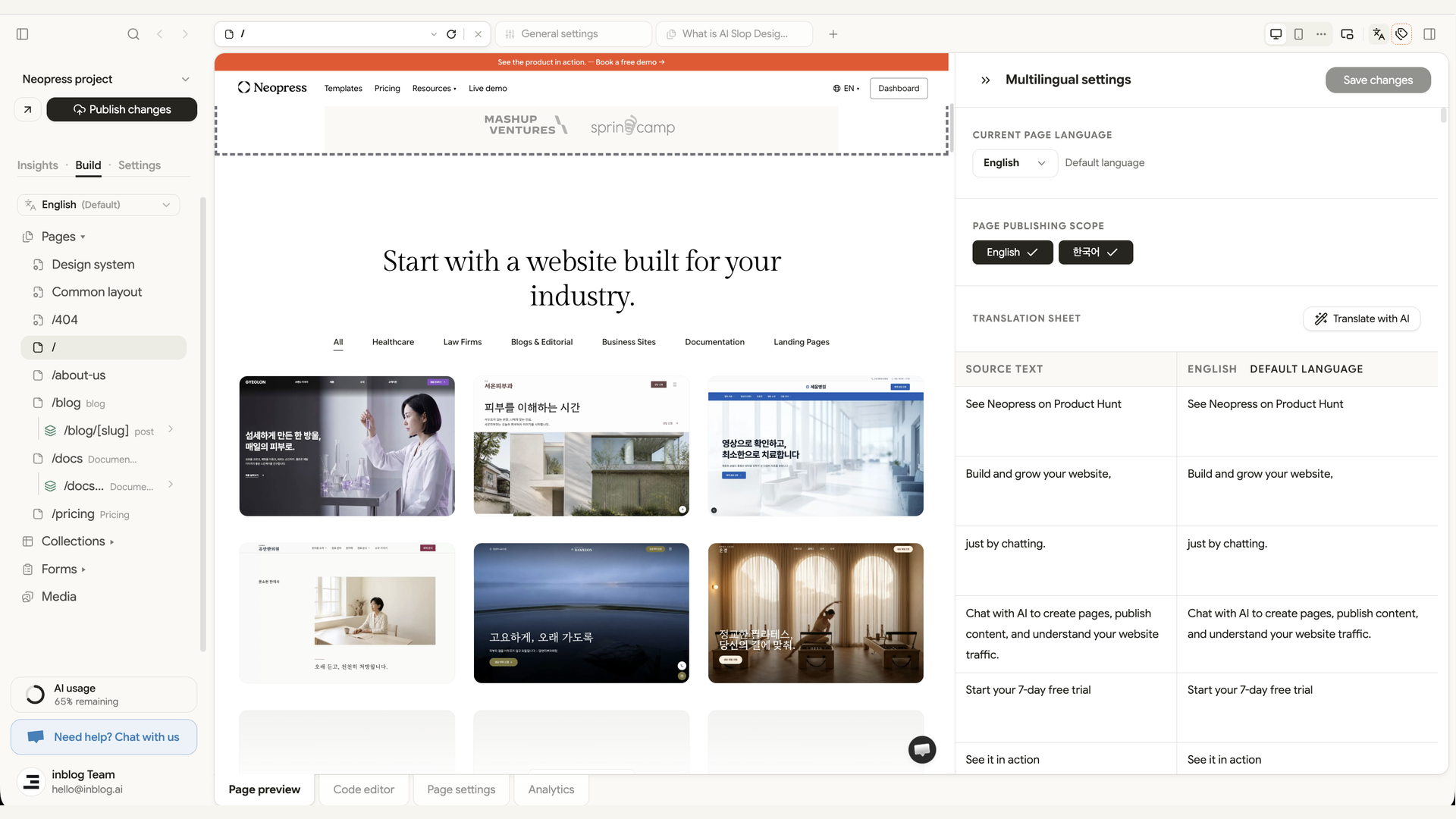
| Publishing scope | Manage language pages separately | Choose which languages each page is published in; unpublished languages stay out of the sitemap and hreflang |
When you add a language
When you turn on Korean as an additional language in Settings, Neopress asks which pages and posts to translate. You can leave out pages you do not want in Korean and choose whether to skip or redo existing translations. When you confirm, the translation request is filled into the AI chat for you.
From there, refine by conversation. Ask for things like "Show prices in US dollars" or "Make the form confirmation message shorter," and the AI edits that language's copy only.
Before you publish
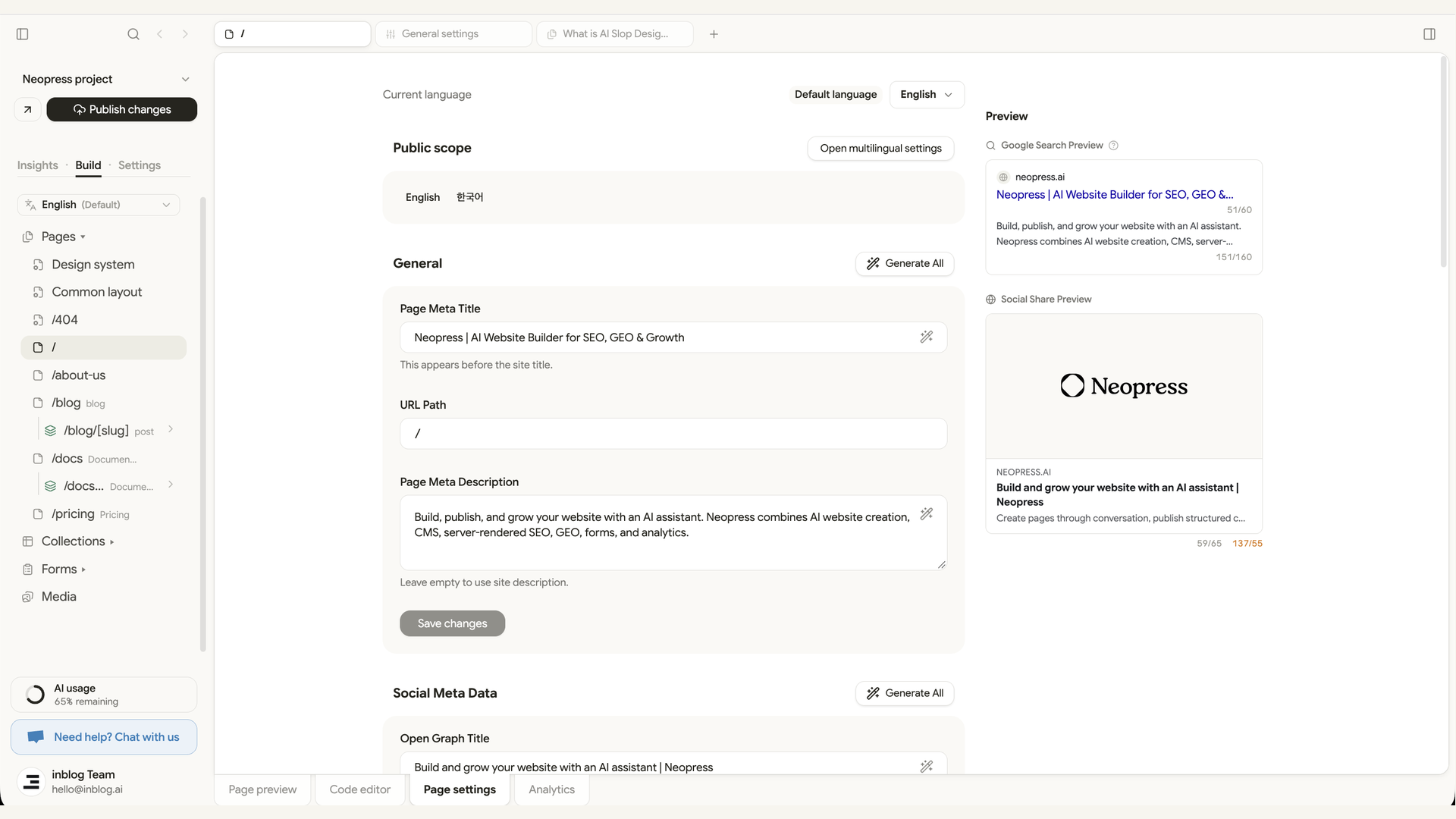
You can also hand the Korean search title and description to the AI. Ask "Write a Korean search title and description for the pricing page," and the change applies only to the Korean URL. The English settings stay as they are.
Neopress does not block publishing when some translations are missing. Before you publish, switch languages in the preview and check steps 3, 4, and 8 of this checklist yourself.
After you publish
With Google Search Console connected, you can ask the AI questions like "Which queries is the Korean pricing page showing up for?" It reads impressions, click-through rate, and position, and suggests what to fix next.
If you use an AI tool that supports MCP, such as ChatGPT or Claude, you can connect Neopress there and create or edit translated blog posts from that tool.
Pre-launch checklist
Fill in this table before an important page goes live. Mark each item ✓ per language, or note the problem. The next time you edit the page, you will know exactly what has been checked.
| Check | English URL | Korean URL |
|---|---|---|
| The URL opens correctly when visited directly | ||
| The body is fully translated | ||
| Search title, description, and main heading are in that language | ||
| The canonical points to the page's own URL | ||
| hreflang lists both language URLs | ||
| The language switcher opens the same page | ||
| Menus, forms, and buttons stay in the same language | ||
| The URL was checked in Search Console |
Multilingual sites are part of the Neopress Growth plan, which you can try free for 7 days. Start with Neopress to add a language and translate your site with AI.
Newsletter
A sharper growth note, once in a while.
Get practical SEO strategies, SSR guides, and AI search insights delivered directly to your inbox.
We respect your privacy. Unsubscribe at any time.