Neopress growth journal
ChatGPT prompts to build a website that actually works

You have a business idea, maybe even a name and a rough idea of what your website should look like. You open ChatGPT and type:
"Build me a professional website."
A few seconds later, you get a homepage, some text, and a layout. It looks promising. But then you notice the contact button doesn't work, the mobile version looks strange, and the content could belong to almost any business.
Sound familiar?
The problem usually isn't that ChatGPT can't help you build a website. It's that a single vague request doesn't give it enough information to create something that meets your needs.
A useful website needs more than an attractive homepage. It needs a clear structure, relevant content, working features, and an experience that makes sense on both desktop and mobile.
The best approach is to guide ChatGPT through the process, one step at a time.
In this guide, you'll find 15 practical ChatGPT prompts for building a website, from planning your pages and writing content to generating code, improving SEO and checking everything before launch.
We'll use one example throughout: a small yoga studio in Lyon called Studio Flow. It wants a website where visitors can discover classes, check schedules, and book a session.
You can replace the example with your own business and adapt each prompt to your needs.
Before you start: What can ChatGPT actually do when building a website?
ChatGPT can help with almost every stage of website creation:
Planning: Decide which pages you need and how visitors should navigate your website.
Writing: Create homepage copy, service descriptions, FAQs, and product information.
Design: Explore colors, fonts, page layouts, and visual directions.
Development: Generate and explain HTML, CSS, JavaScript, and other code.
SEO (search engine optimization): Improve page titles, headings, keyword targeting, and internal links.
Testing: Review code, identify possible issues, and prepare a launch checklist.
Depending on your ChatGPT plan and available features, you may also be able to create and publish a website directly through ChatGPT Sites, rather than simply receiving code.
OpenAI's official ChatGPT Sites guide explains how to describe a website, provide files and references, review a preview, make changes, and publish it. Sites is currently available for Plus and Pro accounts, as well as Business and Enterprise workspaces. Availability and usage limits can change, so check the latest documentation before relying on it.
However, there's an important difference between generating a website and running one.
A booking button isn't automatically connected to a booking system. A checkout page doesn't automatically process payments. And code that looks correct in a chat still needs to be tested in a browser.
Think of ChatGPT as a partner that helps you plan, create, and improve your website. You still need to check that the finished result does what your visitors expect.
How to write better ChatGPT prompts for website creation
Before copying the prompts below, understand one simple principle: the more useful information you give ChatGPT, the less it has to guess.
Compare these two requests:
A vague prompt:
Create a website for my yoga studio.
A more useful prompt:
Act as a website strategist and UX designer (a specialist in how easy a website is to use).
Help me create a website for a yoga studio in Lyon called Studio Flow. We offer beginner yoga, vinyasa classes, and private sessions. Our audience is adults aged 25–45 who want to improve their flexibility and reduce everyday stress.
The main goal is to help visitors understand our classes and book their first session. The website should feel calm, welcoming, and modern. Avoid complicated navigation and make sure the experience works well on mobile.
Before designing anything, suggest the pages and features the website needs. Ask me questions if important information is missing.
The second prompt gives ChatGPT context: the business, location, audience, services, goal, and visual direction.
You don't need to write a long prompt every time. You just need to include the information that matters for the task.
Use this table as a quick reference:
What to include | Questions to answer | Example |
Business | What does your business do? | A yoga studio |
Audience | Who are you trying to reach? | Beginners and experienced adults |
Main goal | What should visitors do? | Book a class |
Content | What information do you have? | Class descriptions, prices, address |
Design | What should the website feel like? | Calm, modern, welcoming |
Requirements | What must the website include? | Mobile layout, schedule, contact form |
One more tip: Give ChatGPT your real information whenever possible. If you haven't decided on your prices or opening hours, ask it to use placeholders instead of inventing details.
If you want to explore other ways to use AI beyond website creation, take a look at our beginner's guide to using AI in marketing.
Now let's put this into practice.
1. Start with the right website plan
One of the easiest ways to waste time is to start designing before deciding what your website actually needs.
A yoga studio, a consulting business, and an online store have different goals. Before generating a homepage, ask ChatGPT to help you define the structure.
Prompt 1: Turn your business idea into a website plan
Use this prompt when you know what your business does but aren't sure which pages to create.
Copy and customize:
Act as an experienced website strategist.
I'm creating a website for [business name], a [type of business] based in [location]. We offer [products or services] to [target audience].
The main goal of the website is to [generate leads, receive bookings, sell products, explain a service, or another goal].
Create a practical website plan that includes:
The essential pages I need.
The purpose of each page.
The information visitors will expect to find.
The main action visitors should take on each page.
The recommended navigation menu.
Any features the website may need, such as a booking system or contact form.
Separate essential pages from optional ones. Explain why each page is necessary. If you need more information, ask me questions before creating the final plan.
Do not add pages just to make the website look bigger.
What you should get: A first sitemap (a map showing the pages of your website), a list of essential pages, and a clear purpose for each one.
For our example, Studio Flow might need:
Page | Purpose | Main action |
Home | Introduce the studio and its classes | View the schedule |
Classes | Explain each type of yoga session | Choose a class |
Schedule | Show available sessions | Book a session |
About | Introduce the studio and instructors | Discover the studio |
Contact | Share location and contact details | Get in touch |
Why this step matters: It prevents you from building pages just because they look good. Every page should help visitors find information or take a useful next step.
Prompt 2: Understand what your visitors need
Your website should be organized around the people using it, not just around what you want to say about your business.
For example, someone visiting a yoga studio website for the first time may want to know:
Are the classes suitable for beginners?
How much does a session cost?
What should I bring?
Do I need to book in advance?
Where is the studio located?
If your website doesn't answer these questions, visitors may leave before contacting you.
Copy and customize:
Act as a UX researcher (someone who studies how people use websites).
My website is for [business type], and my target audience is [describe your audience].
Imagine you are a first-time visitor who has never used this business before.
List the 15 most important questions you would want answered before taking action.
For each question, explain:
Why a visitor would ask it.
Where the answer should appear on the website.
Whether it belongs in the main page content, an FAQ, or a separate page.
How important it is to answer this question before a visitor contacts us or makes a purchase.
Prioritize questions that could prevent someone from contacting us, booking, or buying.
Do not invent customer research or pretend these questions come from actual interviews.
Why use it? You'll build your pages around real visitor concerns instead of filling them with generic company information.
2. Create a design that fits your business
Now that you know which pages you need, you can start thinking about the visual identity.

The goal isn't simply to make the website look modern. It should feel appropriate for your business and make important information easy to find.
Prompt 3: Create a website design direction
Instead of asking ChatGPT to choose random colors and fonts, give it a clear description of your brand.
Copy and customize:
Act as a professional web designer and brand strategist.
I'm creating a website for [business name], a [business type] targeting [audience].
I want the brand to feel [three adjectives]. The website should communicate [main brand message].
Propose two different design directions. For each one, include:
A color palette with HEX codes (the codes used to identify exact colors).
Heading and body font recommendations.
Button styles.
Navigation style.
Image and photography direction.
Suggested homepage layout.
Explain the difference between the two concepts and which one would be more suitable for my audience.
Avoid generic design recommendations. Make sure the colors, typography, and layout work together as one visual identity.
Example: Studio Flow could compare a soft, natural design using warm beige and sage green with a more energetic direction using deep blue and coral.
Once you've chosen a direction, ask ChatGPT to turn it into a simple design system.
Useful follow-up prompt:
I prefer design direction number [1 or 2].
Turn it into a simple design system that I can reuse across every page. Include:
HEX color codes.
Heading and body font sizes.
Spacing rules.
Button styles.
Border and image styles.
Responsive layout guidelines (rules that help the design adapt to different screen sizes).
Keep these decisions consistent across all pages unless I ask you to change them.
This is particularly useful if you're generating several pages separately. Without shared design rules, each page can start looking like a different website.
Prompt 4: Plan a homepage that guides visitors
Your homepage shouldn't try to explain every single thing about your business. It should help visitors understand what you offer and guide them toward the next step.
Copy and customize:
Act as a conversion-focused UX designer (someone who designs websites to encourage useful actions).
Help me plan the homepage for [business name], which offers [products or services] to [target audience].
The main action I want visitors to take is [desired action].
Create a homepage wireframe (a simple plan showing where each section goes) with:
A hero section that immediately explains what we offer.
A clear primary call-to-action (CTA, a button or link encouraging visitors to act).
A short introduction to the business.
The main products or services.
Reasons to choose us, using only information I provide.
Customer reviews or testimonials, with placeholders if I haven't supplied any.
Answers to common visitor questions.
A final call-to-action.
For each section, explain what information it should contain and why it belongs on the homepage. Keep the page focused and avoid unnecessary sections.
What makes this prompt useful? It asks for a wireframe before the finished design. You can review the order of the sections and change it before asking ChatGPT to generate the page.
3. Write website content that sounds like your business
A website can have a beautiful design and still feel unconvincing if its content is vague.
Phrases such as "We provide high-quality solutions tailored to your needs" don't tell visitors much. They need to understand what you offer, who it's for, and why it's relevant to them.
Prompt 5: Write homepage copy without generic marketing language
Copy and customize:
Act as an experienced website copywriter.
Write the homepage content for [business name].
Here is the information you can use:
Business: [description].
Products or services: [details].
Target audience: [audience].
Main customer problem: [problem].
Main benefits: [benefits].
Brand tone: [tone].
What makes us different: [real differentiators].
Write:
Three headline options.
A short supporting paragraph.
One primary CTA and two alternative CTA options.
A short introduction to the business.
Three benefit-focused sections.
A short closing section.
Use simple, natural language and address the visitor directly. Be specific about what the business offers. Avoid clichés, exaggerated claims, and information I haven't provided.
After writing the content, explain which headline is the clearest and why.
Try this next: Once you have the first version, don't immediately accept it. Ask:
Review this homepage as if you were a first-time visitor.
Which sentences are unclear? Which claims are too vague? What information would you still need before contacting this business?
Highlight sentences that could apply to almost any company. Rewrite only the sections that need improvement.
Keep the original brand voice and do not add unsupported claims.
That second request is often more useful than asking ChatGPT to produce another completely new homepage.
Once you have your first draft, you can also use our guide on how to humanize AI-generated text for your blog to make the wording sound more natural and less generic.
Prompt 6: Write service pages that answer customer questions
If your business offers several services, each one deserves a clear explanation.
For Studio Flow, a beginner yoga class and a private yoga session shouldn't have identical descriptions. Visitors need to understand what each option includes and which one suits them.
Copy and customize:
Act as a website copywriter who specializes in service businesses.
Write a service page for [service name], offered by [business name].
Here are the details:
What the service includes: [details].
Who it's suitable for: [audience].
Main benefits: [benefits].
Price or booking conditions: [details, if available].
What customers should expect: [details].
What makes this service different: [details].
Structure the page with:
A clear introduction.
Who the service is for.
What is included.
What customers should know before booking.
Frequently asked questions.
A relevant CTA.
Use a helpful, conversational tone. Don't promise results or add details that aren't supported by the information I provided.
Why use it? Visitors can understand whether the service is right for them without having to contact you for every basic detail.
Prompt 7: Build an FAQ from real customer concerns
An FAQ (frequently asked questions) is more than a place to repeat information already written elsewhere. It should answer the questions that could stop someone from taking action.
Copy and customize:
Act as a customer experience specialist.
My business is [business type], and I offer [products or services].
Create an FAQ section with 10 questions that a first-time visitor might ask before [booking, buying, or contacting us].
Focus on practical questions about:
Prices and payment.
How the service works.
Availability.
Preparation or requirements.
Cancellation or returns.
Customer support.
Write clear answers using only the information I provide.
If an answer requires missing information, mark it as "Information needed" instead of inventing a policy.
Avoid questions that are already answered clearly elsewhere on the page.
A small but important detail: Never let ChatGPT invent return policies, guarantees, prices, opening hours, or customer testimonials. These details need to come from your actual business.
4. Turn your plan into a working website
Once the structure and content are ready, you can move on to development.

This is where you need to be more precise. A request to "make a website" doesn't tell ChatGPT which technologies to use, what should happen when someone clicks a button, or how the page should behave on a phone.
Prompt 8: Generate the first version of your website
If you're comfortable working with code, you can ask ChatGPT to create a simple front-end (the part of a website visitors see and interact with).
Copy and customize:
Act as a senior front-end developer.
Build the first version of a website for [business name], a [business type].
Use:
HTML5 for the structure.
CSS for styling.
Vanilla JavaScript only when necessary for interactions.
The website must include:
A responsive navigation menu.
A homepage hero section.
[List the sections you need].
A contact section.
A footer with relevant links.
Follow this design system: [paste your chosen colors, fonts, and spacing rules].
Technical requirements:
Use semantic HTML (HTML elements that clearly describe the purpose of their content).
Make the layout mobile-first (design for smaller screens before adapting to larger ones).
Use descriptive names for classes and IDs.
Keep HTML, CSS, and JavaScript organized in separate files.
Add accessible labels to form fields.
Make sure buttons and links have clear purposes.
Do not add features that only look functional.
First, explain the proposed file structure. Then generate the code and explain how I can preview it locally.
Why this works better: You're defining the technology, the content, and the expected behavior. You're also asking for a file structure rather than receiving one large block of code with no explanation.
If you don't know which technology to use, ask ChatGPT to recommend one based on your needs before generating the code.
If you want to create a website without writing or managing code yourself, our guide to what a no-code website builder is and how it works explains the basics.
Prompt 9: Make the website responsive
A website that works on a desktop screen may be difficult to use on a phone. Navigation can become cramped, text can overflow, and buttons can be too small to tap comfortably.
Don't just ask ChatGPT to "make it mobile-friendly." Tell it what to inspect.
Copy and customize:
Act as a responsive web design specialist.
Review the following website code:
[Paste your HTML and CSS.]
Check how the layout should behave on:
Small mobile screens.
Larger smartphones.
Tablets.
Desktop screens.
Look for:
Horizontal scrolling.
Text that becomes too small or difficult to read.
Images that overflow their containers.
Navigation that is difficult to use.
Buttons and forms that are difficult to tap.
Sections with inconsistent spacing.
Suggest the necessary CSS changes. Keep the existing visual identity and content.
Explain which screen sizes or components I should test manually. Do not claim that the layout has been tested on devices unless you have actually tested it.
Remember: ChatGPT can suggest responsive CSS, but you still need to preview the result at different screen widths.
Prompt 10: Add a real feature instead of a decorative button
This is one of the most important steps.
Imagine that your yoga studio website has a "Book a class" button. It looks great, but clicking it does nothing. The website may look finished, but it doesn't achieve its main purpose.
Before asking ChatGPT to add a feature, explain what the visitor should be able to do and what should happen to the information afterward.
Copy and customize:
Act as a full-stack developer (someone who works on both the visible website and the systems behind it).
I want to add a [booking form / contact form / newsletter signup / product filter] to my website.
The visitor should be able to:
[First action].
[Second action].
[Final action].
Explain what is needed for this feature to work from beginning to end.
Separate the front-end interface from any back-end (the part that processes and stores information), database, or third-party service requirements.
Include:
The fields or controls required.
Validation rules (checks that make sure the information is entered correctly).
Success and error messages.
What happens if the visitor submits incomplete information.
Where the submitted information will be stored or sent.
Any security or privacy considerations.
Do not create a button that only looks functional. Clearly identify any integrations that still need to be configured.
For example: A real booking feature may need a booking platform or back-end to store available sessions, prevent double bookings, and send confirmation emails. A form design alone cannot do all of that.
5. Use ChatGPT to improve your website's SEO
SEO shouldn't be something you add only after the website is finished.

Your page structure, headings, content, and internal links all influence how clearly search engines and visitors understand your website.
ChatGPT can help you prepare these elements, but it shouldn't invent keyword data or promise that a page will rank.
Prompt 11: Create a keyword map for your website
Instead of asking ChatGPT to give you a random list of keywords, ask it to connect search terms to specific pages.
Copy and customize:
Act as an SEO strategist.
My website is for [business type] in [location]. I offer [products or services], and my target audience is [audience].
Create an initial keyword map for my website.
For each suggested keyword, include:
The likely search intent (what the person wants to find).
The page that should target it.
A suggested H1 heading (the main title of a page).
Related questions visitors might have.
Relevant internal linking opportunities.
Separate local, informational, and commercial searches.
Do not invent search volumes, keyword difficulty scores, or ranking estimates. Tell me which keyword metrics I should verify using an SEO research tool.
Example: Studio Flow could investigate searches such as "beginner yoga classes in Lyon," "vinyasa yoga Lyon," and "private yoga sessions." The keyword map helps decide which page should answer each type of search.
Once you have your keyword ideas, verify their search volume and competition using an SEO tool or keyword research platform. ChatGPT can organize your research, but it shouldn't pretend to have measured data it hasn't accessed.
Want to go further than keyword planning? Read our guide to using AI to increase website traffic for more ideas on improving your online visibility.
Prompt 12: Improve an existing page for SEO
If you've already written your content, you don't need to start again.
Ask ChatGPT to review the page and identify what is missing.
Copy and customize:
Act as an SEO content editor.
Review this website page:
[Paste the page content.]
Main keyword: [keyword].
Target audience: [audience].
Search intent: [informational, commercial, or transactional].
Evaluate:
Whether the page answers the visitor's main question.
Whether the heading structure is clear.
Whether important information is missing.
Whether the keyword is used naturally.
Whether the content repeats itself.
Whether internal links would help visitors.
Whether the CTA matches the page's purpose.
Give me a prioritized list of improvements. Then rewrite only the sections that genuinely need work.
Keep the writing natural and useful. Do not add keywords where they don't belong or invent facts to make the page longer.
This is particularly useful for improving an existing website without changing everything just for SEO.
Prompt 13: Write better SEO titles and meta descriptions
Your SEO title and meta description help explain what a page is about in search results.
A meta description is the short summary that may appear below a page title in Google. It doesn't guarantee a higher ranking, but it can help people understand whether your page is relevant to their search.
Copy and customize:
Act as an SEO copywriter.
Create SEO title and meta description options for this page:
Page topic: [topic].
Main keyword: [keyword].
Target audience: [audience].
Main benefit of the page: [benefit].
Provide three title options and three meta descriptions.
Make each option descriptive and relevant to the page. Avoid clickbait and keyword stuffing (repeating keywords unnaturally).
Explain which combination best communicates what visitors will find.
Do not promise anything that the page doesn't actually deliver.
Afterward, check that the title and description accurately represent the final page. A good search snippet should set the right expectation, not promise something the page doesn't deliver.
6. Ask ChatGPT to review the website before publishing
This is the step many people skip.
You've generated the pages, added the content, and chosen the design. But have you actually checked whether everything works?
The 2025 Stack Overflow Developer Survey offers a useful reminder of why reviewing AI-generated work matters.
Among respondents:
84% said they were using or planning to use AI tools in their development process.
66% said their biggest frustration was dealing with AI solutions that were almost right, but not quite.
45% said debugging AI-generated code was more time-consuming.
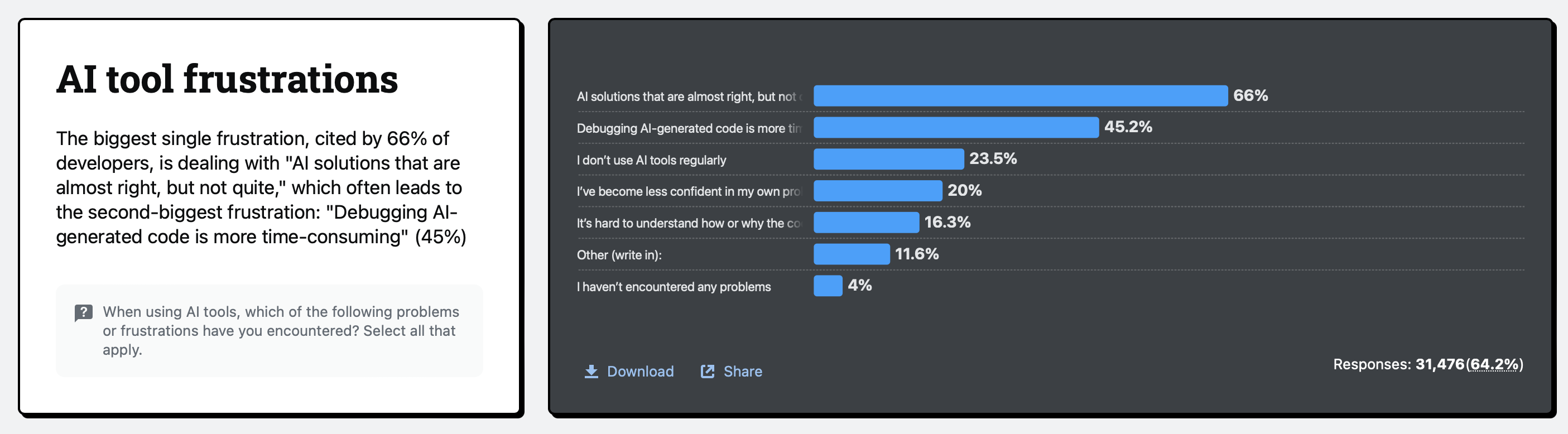
These figures don't mean that AI-generated websites are automatically unreliable. They show why you shouldn't assume that generated code is correct without checking it.
Prompt 14: Run a website quality review
Copy and customize:
Act as a website QA specialist (someone who checks whether a website works correctly).
Review the following website code and content:
[Paste your code or provide the relevant files.]
My website's main goal is [goal], and the most important visitor action is [action].
Review the website for:
Broken or unclear navigation.
Missing or misleading content.
Buttons and links that may not work.
Responsive layout problems.
Form validation and error messages.
Accessibility issues (problems that make a website harder for some people to use).
Inconsistent colors, typography, and spacing.
Basic SEO issues.
Create a table with three columns: issue, why it matters, and recommended fix.
Prioritize issues that could prevent visitors from completing the main action.
Do not claim that you have tested something you cannot actually access or run. Separate code issues you can identify from tests that I need to perform in a browser.
Why use it? You'll get a prioritized list instead of a vague response saying that your website looks good.
Prompt 15: Create a final pre-launch checklist
Once you've fixed the issues, use this prompt to prepare for publication.
Copy and customize:
Act as a website launch specialist.
I'm preparing to publish a website for [business type].
Create a practical pre-launch checklist covering:
Page content and spelling.
Navigation and internal links.
Mobile and desktop display.
Contact forms and interactive features.
SEO titles, descriptions, and indexing settings.
Image optimization and alt text (descriptions that help explain images to screen readers).
Accessibility checks.
Privacy information and data collection.
Domain, hosting, and SSL configuration (the security setup that encrypts information sent between a website and its visitors).
Backups and maintenance.
For each item, explain how I can check it and what a successful result looks like.
Separate essential checks from improvements I can make after launch.
Do not mark anything as complete unless it has actually been checked.
You can use the checklist to work through the final details one by one. Don't publish just because ChatGPT says the website is ready.
What should you check before publishing an AI-generated website?
Prompts can help you identify problems, but some things need to be measured or tested using dedicated tools.
Here are four areas worth checking before your website goes live.
1. Website speed and performance
A page can look great but still feel slow or unstable when someone visits it.
Google uses three Core Web Vitals (metrics that measure the real-world experience of using a page) to evaluate loading performance, responsiveness, and visual stability.
Metric | What it measures | Good target |
LCP (Largest Contentful Paint) | How quickly the main visible content loads | 2.5 seconds or less |
INP (Interaction to Next Paint) | How quickly the page responds to interactions | Less than 200 ms |
CLS (Cumulative Layout Shift) | How much the layout moves unexpectedly | Less than 0.1 |
These are Google's recommended thresholds for a good user experience. You can check your website using PageSpeed Insights and monitor field performance through Google Search Console.
The way your website delivers content can also affect how search engines access it. Learn more in our guide to why server-side rendering (SSR) is essential for SEO.
Try asking ChatGPT:
Review this page's HTML, CSS, and JavaScript for potential performance problems.
Look for oversized images, unnecessary scripts, resources that delay the page from displaying, and layout issues.
Suggest improvements, but don't invent performance scores. I'll use PageSpeed Insights to measure the actual result.
2. Website accessibility
Your website should be usable by people with different abilities and different ways of navigating the web.

The W3C's Web Content Accessibility Guidelines (WCAG) 2.2 cover areas such as keyboard navigation, text alternatives, color contrast, and accessible interactions.
Start by checking:
Can visitors navigate the website using only a keyboard?
Do images have useful alternative text when needed?
Are form fields clearly labeled?
Is text readable against its background?
Can visitors identify buttons and links?
Are error messages easy to understand?
Try asking ChatGPT:
Review this page against relevant WCAG 2.2 Level AA criteria (a commonly used accessibility target).
Identify potential problems with keyboard navigation, image alt text, form labels, color contrast, and interactive elements.
Suggest code improvements and tell me which checks require manual testing.
ChatGPT can help you spot issues, but its review alone does not prove that your website meets accessibility requirements.
3. SEO and content quality
Check that every important page has a clear purpose and answers a real visitor question.
Google's SEO Starter Guide and its guidance on helpful, reliable, people-first content encourage website owners to create useful, original content rather than simply reworking information from other websites.
Before publishing, check that:
Each important page has a clear H1 heading.
Page titles and meta descriptions describe the actual content.
Your internal links help visitors discover relevant pages.
Important information isn't hidden behind vague wording.
Your content reflects your real products, services, and experience.
You haven't published generic AI-generated text without reviewing it.
4. Forms, bookings and payments
If your website collects information, accepts bookings, or processes payments, test the entire process.
For example, submit your contact form with valid information, then try leaving required fields empty. Check whether the visitor receives a useful confirmation or error message.
For bookings and payments, also verify that:
Available time slots are accurate.
A booking is actually saved.
Confirmation messages are sent.
Payments are processed by the configured provider.
Customer information is handled securely.
Visitors can understand cancellation and refund conditions.
Never assume a feature works just because ChatGPT generated the interface for it.
Can you build a website directly in ChatGPT?
Yes. ChatGPT now offers a feature called Sites, which can create, host, and share websites and lightweight web apps (simple applications that run in a browser).
According to OpenAI's official documentation, the process works like this:
Describe the website you want to create.
Provide relevant content, files, data, links, and design preferences.
Review the generated preview.
Ask ChatGPT to make changes.
Deploy your site to generate its URL.
Choose who can access it and review the published version.
For example, instead of asking ChatGPT only to generate HTML and CSS, you could describe the actual website you want:
Build a website for Studio Flow, a yoga studio in Lyon.
Use the class descriptions, prices, and contact details in the files I provide.
Create a homepage, classes page, schedule page, and contact page. Use a calm visual style with warm beige and sage green. Make the website easy to navigate on mobile.
Include a clear booking action, but do not pretend bookings are stored unless a working booking system is connected.
Show me a preview so I can review the pages before publishing.
You can then review the result and ask for focused changes, such as moving the booking button, changing the colors, or making the schedule easier to read.
One important limitation: Creating a website preview and deploying it doesn't automatically mean every feature has a complete back-end. If your website needs saved customer records, sign-in, payments, or bookings, you must define how those features work and test them.
When should you use ChatGPT, and when should you use an AI website builder?
ChatGPT is useful when you want help thinking through your website, generating content, exploring designs, or working with code.
But if you don't want to manage files, hosting, integrations, and technical configuration yourself, a dedicated AI website builder may be a better starting point.
For example, Neopress lets you create and update website pages through chat, publish content, and understand website traffic. It combines a conversational workflow with tools for managing a business website.
Not sure which platform to choose? We've compared different options in our guide to the 10 best AI website builders to try in 2026.
The difference is that you can work on your website within a platform designed to create and manage websites, rather than asking ChatGPT for code and then setting up every part separately.
Here's a simple way to decide:
Your goal | A useful starting point |
Plan a website and organize your ideas | ChatGPT |
Write website copy and FAQs | ChatGPT |
Generate or review HTML and CSS | ChatGPT |
Create and manage pages through a visual or conversational builder | An AI website builder |
Launch a business website without managing code | A hosted website platform |
Run an online store with payments and orders | An e-commerce platform with the required integrations |
Build a custom application with accounts and saved data | A suitable app platform or custom development |
You don't necessarily have to choose one or the other. You can use ChatGPT to plan the website and prepare its content, then use a website builder to create and manage the published version.
Final thoughts
ChatGPT can make website creation easier, but the quality of the result depends on how you guide it.
Don't start by asking it to build everything. Start by explaining your business, understanding your visitors, and deciding what the website needs to achieve. Then use focused prompts to create the pages, improve the design, write the content, and check the features.
And don't skip the testing stage. A website that looks finished isn't necessarily a website that works.
The best approach is to treat ChatGPT as a collaborator: give it useful information, review what it creates, ask specific follow-up questions, and make sure the final website genuinely helps your visitors.
FAQ:
1. What is the best ChatGPT prompt for building a website?
Start with a prompt that explains what your business does, who your visitors are, what the website should achieve, and which pages or features you need. Ask ChatGPT to create a website plan first. Once you approve the structure, move on to design, content, and development.
2. Can ChatGPT build a complete website from one prompt?
It can help create a first version, but one prompt rarely provides enough detail for a complete, reliable website. A better approach is to build in stages: plan the pages, define the design, create the content, generate the website, and test the features.
3. Can I use ChatGPT to build a website without coding?
Yes. You can ask ChatGPT to generate code without writing it yourself, or use ChatGPT Sites if the feature is available on your account. You can also use a dedicated AI website builder. However, publishing a website and connecting features such as bookings, payments, or databases may still require a suitable platform or technical setup.
4. Can ChatGPT generate HTML, CSS, and JavaScript?
Yes. You can ask it to generate individual components or complete front-end pages using HTML, CSS, and JavaScript. Specify the expected behavior, design requirements, and file structure. Then test the generated code in a browser before publishing it.
5. Can ChatGPT create a website that ranks on Google?
ChatGPT can help with keyword planning, page structure, headings, titles, and content improvements. However, it cannot guarantee rankings. Search visibility also depends on the usefulness of your content, your website's technical setup, competition, and other factors.
6. Can ChatGPT create an online store?
ChatGPT can help plan an online store, write product descriptions, generate page designs, and produce code. But a real store also needs working payment processing, order management, inventory, and secure handling of customer information. Those features require a properly configured e-commerce platform or back-end.
7. How do I make ChatGPT stop generating generic website content?
Give it specific information about your business, customers, products, and brand voice. Share examples of the language you like, explain what makes your business different, and tell it not to invent claims or facts. You can also ask it to review its own writing and identify sentences that could apply to almost any business.
8. How can I check whether a ChatGPT-generated website works?
Open the website in a browser and test it yourself. Check every link, button, form, and interactive feature. Preview it on mobile and desktop, run a performance test with PageSpeed Insights, and review accessibility. If the website includes bookings or payments, complete a test transaction or booking using the platform's recommended test mode.
Newsletter
A sharper growth note, once in a while.
Get practical SEO strategies, SSR guides, and AI search insights delivered directly to your inbox.
We respect your privacy. Unsubscribe at any time.